July 12, 2026
If I Started Learning Product Design Today
The path I took is now the wrong path. Here's exactly what I'd do instead, and what today's tools change about the journey.

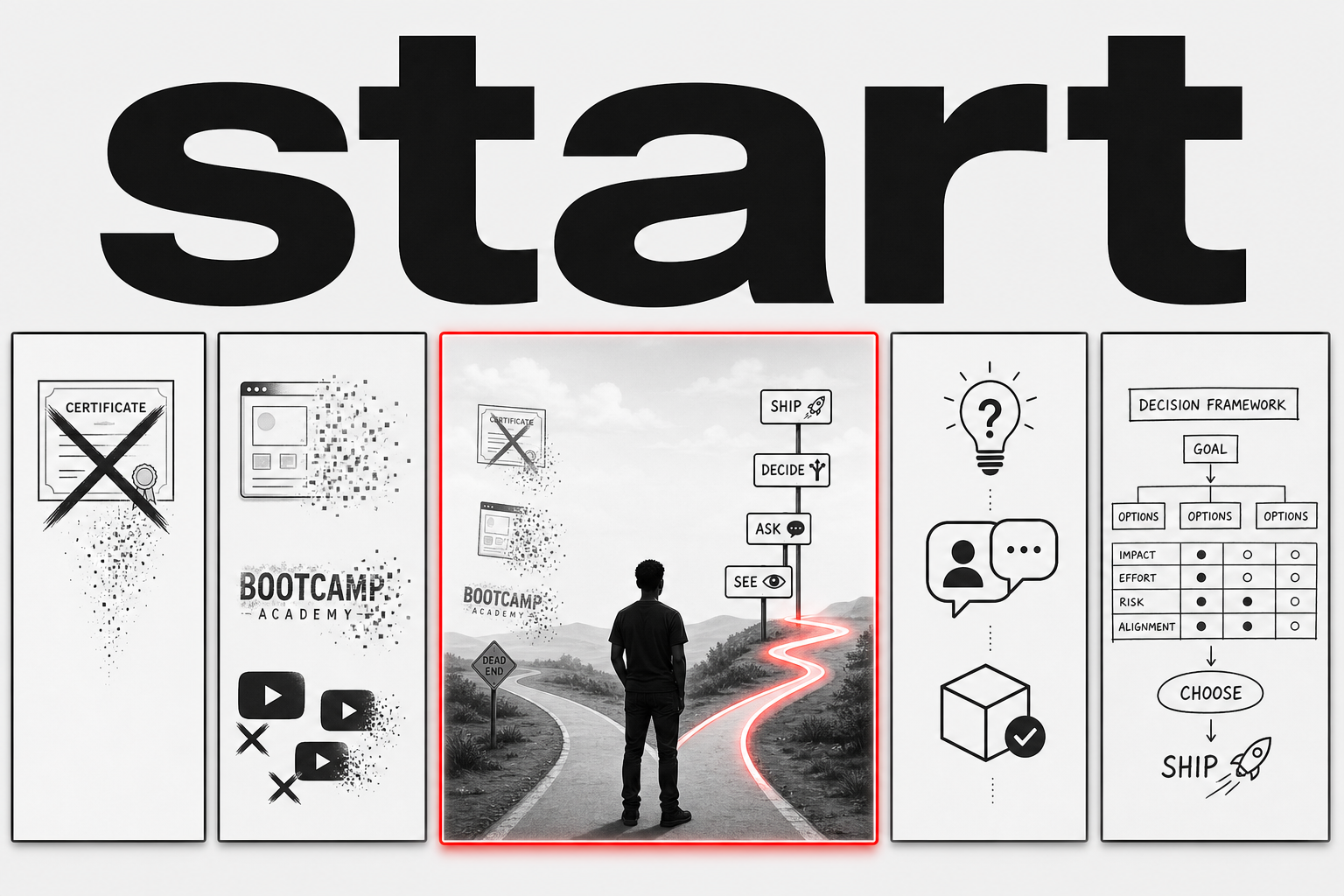
I became a product designer over twelve years ago. I’ve watched the entry path evolve through every era: Photoshop comps, Sketch, the Figma revolution, bootcamp factories, and now a wave of tools: AI agents, no-code builders, code-on-canvas. Tools that can design, build, and ship faster than any junior hire.
If I were starting today, I wouldn’t follow any of those paths. Including mine.
The path I took is now the wrong path. Not because the fundamentals changed. Because the entry-level job that path prepared you for doesn’t exist anymore. Or it exists, but it’s shrinking fast, and the person who can do it without thinking is being replaced by a tool: an AI agent, a code generator, a no-code builder. It costs a fraction of a salary and works around the clock.
If I were starting from zero today, I’d do almost everything differently. Here’s the path I’d take.
What died
Let me be direct about what no longer matters for someone entering the field.
Fake case studies. The portfolio piece where you redesign Instagram or Spotify or a food delivery app that doesn’t exist, with fake user personas named Sarah who “needs a better way to order groceries.” Everyone can spot these. Recruiters skip them in three seconds. AI can generate ten of them in the time it takes you to make one. This was never good practice. It’s now actively harmful because it teaches you to design without constraints, without real users, and without consequences.
Learning Figma before learning to think. Figma is a tool. It will change. It already changed at Config 2026: Code Layers, the Figma agent, generative plugins, motion tools. The canvas is expanding faster than any curriculum can keep up with. If your foundation is “I know Figma shortcuts,” your foundation is sand. Six months from now, the agent will know more shortcuts than you. What it won’t have is judgment. Taste. The ability to look at a problem and know which problems matter before you open the canvas.
Redesigning things that already work. The “UI redesign challenge” industrial complex. Pick an app, give it a new coat of paint, call it a case study. This teaches you decoration, not design. Design is not making things prettier. Design is making things work better. If you can’t articulate what was broken before your redesign and prove it got better after, you didn’t design anything. You decorated.
The “design handoff” as a job function. For years, a significant chunk of junior design work was preparing files for engineering: organizing layers, writing specs, documenting states, annotating interactions. Code Layers doesn’t eliminate this overnight, but the direction is clear. The job of translating design into engineering specifications is being absorbed into the tool. What remains is the job of making decisions worth translating.
What technology actually changed
The conversation about AI and design is loud and mostly wrong. People are either panicking or dismissing. But the real story isn’t about AI alone. It’s about the entire stack collapsing.
Five years ago, going from an idea to a shipped product required a team. Designer, engineer, maybe a front-end specialist. The distance between a Figma frame and working code was measured in sprints. Today, that distance is measured in clicks. Code Layers turns a design frame into interactive code on the canvas. No-code builders like Framer and Webflow let you ship a full site without writing a line. AI assistants generate variants, write copy, check accessibility, and produce assets in seconds. Telegram and WhatsApp bots let you ship functional products inside apps people already have open.
The combination is what matters. Not any single tool. The fact that a designer today can research, design, build, and ship a working product without leaving their chair, without waiting for an engineering team, without a budget beyond their laptop. That’s the leap.
This rewrites the entry-level contract. You used to get hired to do the mechanical parts: prepare files, write specs, document states, annotate interactions. Those tasks are being absorbed into the tooling, one by one. Not by AI alone. By the entire pipeline compressing. A senior designer with today’s stack can produce more output than a senior designer with two juniors and an engineer could five years ago.
This sounds terrifying if you’re trying to enter the field. It should. But it also clarifies something important: the part of design that was never mechanical, the part that was always the actual job, is more valuable than ever.
Deciding what to build. Understanding why people behave the way they do. Knowing which problems are worth solving. Recognizing when a solution is good enough versus when it needs more work. Having an opinion and being able to defend it with evidence, not just preference.
A tool can generate a hundred button variants. It cannot tell you which one is right for this user, in this context, at this moment. That’s the job. That was always the job. We just buried it under enough mechanical work that we forgot.
The curriculum
If I started today, I wouldn’t open Figma for the first three months. I’d do this instead.
Month one: learn to see. Before you make anything, learn to look at things critically. Pick five products you use every day. For each one, write down: what’s the most important thing on this screen? What’s the second most important? How does the design tell you that? Now find the things that don’t matter and should have been cut. Do this every day for a month. You’re training your eye to see hierarchy, to spot filler, to recognize intention. This is taste. It can be built. Most designers skip this step and their work shows it forever.
Month two: learn to ask. The hardest skill in product design is not visual. It’s knowing what question to ask next. Find a product you use that frustrates you. Not one you admire. One that fails at something. Write down exactly what frustrates you and why. Then ask: who decided it should work this way? What constraint were they under? What would they have needed to know to make a different decision? If you can answer these, you’re doing product thinking. If you can’t, you’re just complaining about a button color.
Now find someone who uses the product differently than you do. Ask them about their experience. Not a survey. A conversation. Your goal is not to confirm what you already think. Your goal is to hear something that surprises you. If nothing surprises you, you didn’t ask the right questions.
Month three: learn to decide. Design is a series of decisions. Most of them are tradeoffs. Speed versus clarity. Simplicity versus flexibility. One user’s need versus another’s. Pick a real problem. Something in your own life, something small. Design three different solutions. Not three different visual treatments. Three genuinely different approaches to solving the problem. Then force yourself to choose one and articulate why, with specific reasons, not taste. “This one is better because the user can complete the task in two steps instead of four” is a reason. “This one feels cleaner” is not.
Month four: now open Figma. Learn the tool because you need it to express decisions you’ve already learned to make. Not the other way around. Don’t learn every feature. Learn the ones that help you communicate: auto layout, components, variants, variables. Learn to build a simple design system because it forces you to think about consistency and scale. The Figma agent will fill in the gaps you don’t know. What it can’t fill in is your judgment about what belongs in the system in the first place.
Month five: learn to ship. Design something real and put it in front of real people. Not a prototype. Not a case study. Something that works. It doesn’t need to be a full product. A simple landing page. A Telegram bot. A Notion template that solves a real problem for a real person. Ship it. Watch someone use it. Watch where they get confused. Fix it. Ship again. This cycle teaches you more in three weeks than a year of fake case studies.
Month six and beyond: specialize. By now you’ll know what part of design you’re drawn to. Interaction design. Design systems. Product strategy. Research. Content design. Go deeper into that. Read the people who are best at it. Find their work. Study it the way a musician studies recordings: not to copy, but to understand the decisions underneath. Build a body of real work, however small. Ship things, document what you learned, repeat.
Notice what’s not on this list: bootcamps, certifications, “100 days of UI” challenges, redesigning Spotify, Dribbble likes, Behance features. None of these correlate with being good at the job. Some of them actively prevent it by teaching you to optimize for the wrong things.
The uncomfortable part
Today’s tools make this path harder and easier at the same time.
Easier because you can move faster than any generation before you. You can go from idea to working product in an afternoon. You can ship a Telegram bot, a landing page, a functional prototype without writing code or hiring anyone. The mechanical ceiling that used to slow beginners down: “I can’t code,” “I don’t have an engineer,” “I can’t afford to build this.” That ceiling is gone. You can focus on thinking sooner because the building part is no longer the bottleneck.
Harder because the temptation to skip the thinking is stronger than ever. Why spend month one training your eye when a tool can tell you what’s “good”? Why spend month three making hard decisions when an AI can generate options and rank them? Why learn to ship when a no-code builder can ship for you?
Here’s why: because if you skip the thinking, you will hit a ceiling. Fast. You’ll be able to produce work that looks polished but doesn’t solve anything. You’ll have taste you can’t defend. You’ll make decisions you can’t explain. And when the tools get better, which they will, the only thing that distinguishes your output from anyone else’s will be the thinking you never learned to do.
The designers who thrive in the next five years won’t be the ones who learned the most tools. They’ll be the ones who can look at a problem, understand the people it affects, make a clear decision about what to build, and articulate why. The tools can help with all of that. They cannot replace any of it.
Start
Don’t enroll in a bootcamp. Don’t watch fifty hours of YouTube tutorials. Don’t redesign Instagram.
Find a product you use every day. Open it. Ask yourself: what’s the most important thing on this screen, and how do I know?
That’s day one. Everything else follows from there.